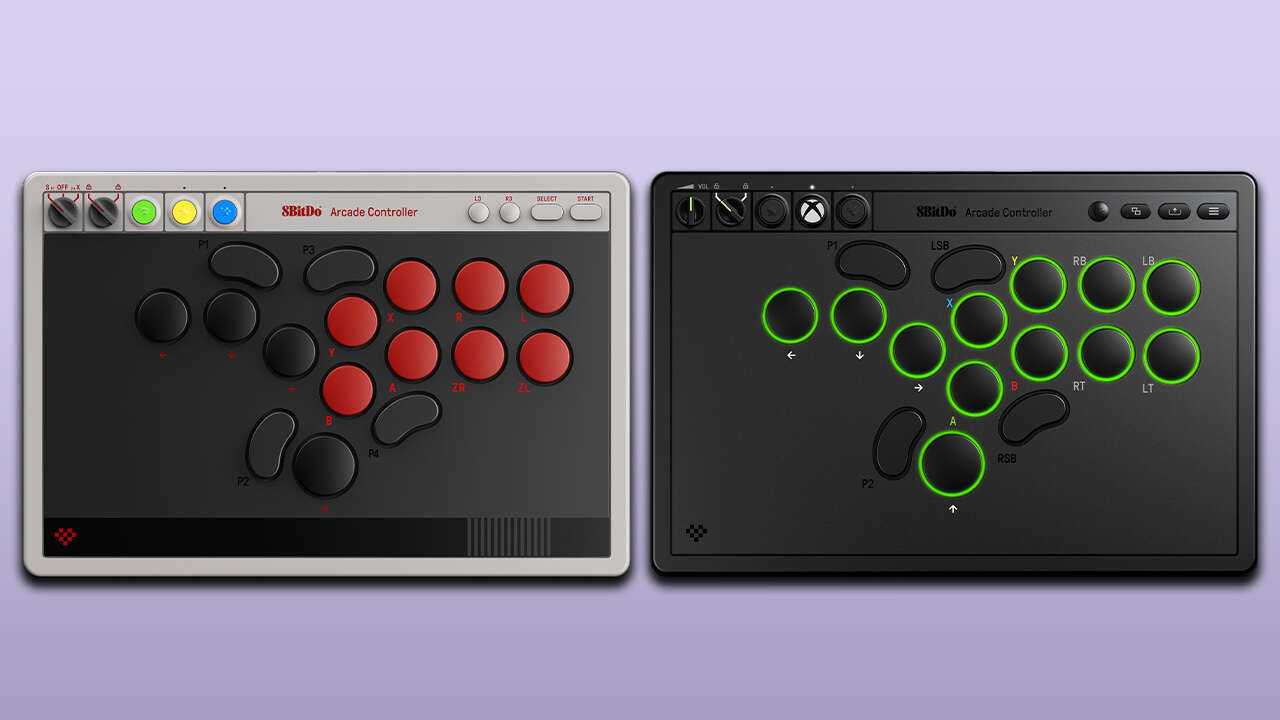
The All-Button Arcade Controller has 12 circular buttons representing inputs for the D-pad, face buttons, and bumpers/triggers. These buttons have RGB lighting rings with six customizable effects modes. It also has four bean-shaped buttons. Two of these are for right and left stick clicks (RSB/LSB), while the other two are extra remappable buttons (P1/P2).
All of the button use low-profile Kailh Wizard mechanical switches. Like 8BitDo’s original Arcade Stick, the Arcade Controller has a hot-swappable design. Button caps can easily be removed to clean the switches or swap in new caps. The Arcade Controller comes with four locking caps for RSB/LSB and P1/P2, in case you want to disable them to avoid accidental presses.
As an officially licensed controller, it has the normal settings buttons found on the Xbox Wireless Controller on the top row: Xbox, View, Menu, and Share. You can adjust light ring brightness and switch between lighting modes with the RGB button. The P1/P2 buttons can be remapped on the fly with the Star button, and you can cycle through custom control layouts with the Profile button. The two dials on the top left enable/disable tournament mode and adjust the sound volume when using a wired headset. The Xbox version of the All-Button Controller has a 3.5mm audio jack.
With 8BitDo’s Ultimate Software X for Xbox and PC, you can remap all inputs, customize RGB lighting effects, and choose your SOCD priority mode.
The Arcade Controller has a compact form factor and is only 1.6cm thick. The control panel has a smudge-resistant, tempered glass faceplate, and the silicone mat on the bottom is designed to prevent movement while playing. Foldable magnetic feet can be flipped down to adjust the angle.
You can sync wirelessly to Xbox Series X|S, Xbox One, or PC with the included 2.4GHz adapter, which is stored in a magnetic compartment on the bottom of the fight pad. The USB-C charging cable can also be used for wired mode. With the RGB lighting rings on and headphones plugged in, the battery is likely to drain in roughly 20 hours. If you turn the RGB lighting rings off and don’t use a wired headset, you can get up to 40 hours of play time between charges.
The Nintendo Switch 1/2 version has the retro-inspired red/black/gray NES color scheme seen on a number of 8BitDo controllers. The overall design matches the Xbox version, but there are a few differences.
This edition supports Bluetooth on Switch and Switch 2, 2.4GHz Wireless on PC, and wired for both consoles and PC. You can get up to 20 hours of play time on a full charge.
The Switch version has eight red circular buttons and four black directional inputs. One cool feature is that when you toggle the dial from S-Input to X-Input, the faceplate’s button labels change from Switch to Xbox layout.
Instead of RSB/LSB buttons, the Switch version has two extra programmable buttons (P3/P4). It still comes with locking caps for the programmable buttons, though. Right and left stick clicks are found on the top row as L3 and R3, in the same spot where the RGB button is on the Xbox edition. The Switch version does not have lighting rings or a 3.5mm audio jack.
The input mode dial replaces the volume control, but the other dial still locks/unlocks tournament mode. Instead of the Xbox button, the Switch version has a Bluetooth pairing button. Star and Profile buttons allow you to remap the four programmable buttons on the fly and switch through control presets. These buttons match the colors of the Super Famicom controller.
With 8BitDo Ultimate Software V2, you can change SOCD modes, remap all of the buttons, and create macros.
8BitDo All-Button Arcade Fight Pads On Sale For Best Prices Yet